
Home
含鉻污泥再利用計畫
- 詳細內容
- 作者 Super User
- 分類:分類1
- 點擊數:644
含鉻污泥再利用計畫
A-8801 電鍍製程之廢水處理污泥之處理解決方案
A-8801 污泥之處理解決方案(1)固化、掩埋 (2) 焚化 (3) 再利用
再利用處理方式-重金屬污泥資源化技術
| 含鋅之多種 金屬污泥 | 溶提-置換- 電解 | |
| 不含鋅之多 種金屬污泥 | 溶提-置換- 電解-結晶 | |
| 多種金屬污 泥 | 氨浸 | |
| 單一銅污泥 | 酸溶提 | |
| 含銅污泥 | 熔煉 | |
| 本提案之方式 |
鉻污泥之再利用去處
- 回收後再給電鍍廠使用(化學法)
- 陶瓷色料 (本提案之方式)
-各種陶瓷產品上皆使用色料(紅 黃 藍)- 磁磚
- 地磚
- 壁磚
- 陶瓷藝品
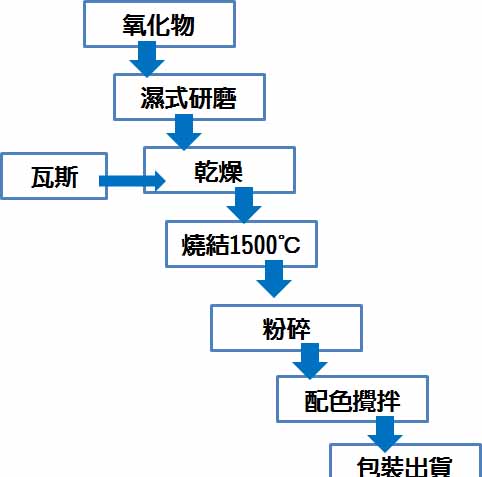
陶瓷色料之原料
一般色料之原料為進口色料氧化物:
氧化鉻
氧化鐵
氧化鈷
各種氧化物
製造程序圖
成本與效益分析
- 成本
–設置成本
- 申請成本
- 生產設備成本 (現有設備增加容量利用)
- 防治設備成本
–燃料成本、廠運成本
–運輸成本
- 效益
–成本低於(固化+掩埋)或(焚化)或(化學法)
–產出產品有附加價值
–最終廢棄物大大減少
三贏
- 事業單位:節省廢棄物處理成本
- 再利用單位:節省原物料成品
- 環保與地球:
–有害廢棄物無害化
–無害廢棄物減量化
功德世界

Getting Started
- 詳細內容
- 作者 Super User
- 分類:分類1
- 點擊數:1272
It's easy to get started creating your website. Knowing some of the basics will help.
What is a Content Management System?
A content management system is software that allows you to create and manage webpages easily by separating the creation of your content from the mechanics required to present it on the web.
In this site, the content is stored in a database. The look and feel are created by a template. Joomla! brings together the template and your content to create web pages.
Logging in
To login to your site use the user name and password that were created as part of the installation process. Once logged-in you will be able to create and edit articles and modify some settings.
Creating an article
Once you are logged-in, a new menu will be visible. To create a new article, click on the "Submit Article" link on that menu.
The new article interface gives you a lot of options, but all you need to do is add a title and put something in the content area. To make it easy to find, set the state to published.
Template, site settings, and modules
The look and feel of your site is controlled by a template. You can change the site name, background colour, highlights colour and more by editing the template settings. Click the "Template Settings" in the user menu.
The boxes around the main content of the site are called modules. You can modify modules on the current page by moving your cursor to the module and clicking the edit link. Always be sure to save and close any module you edit.
You can change some site settings such as the site name and description by clicking on the "Site Settings" link.
More advanced options for templates, site settings, modules, and more are available in the site administrator.
Site and Administrator
Your site actually has two separate sites. The site (also called the front end) is what visitors to your site will see. The administrator (also called the back end) is only used by people managing your site. You can access the administrator by clicking the "Site Administrator" link on the "User Menu" menu (visible once you login) or by adding /administrator to the end of your domain name. The same user name and password are used for both sites.
Learn more
There is much more to learn about how to use Joomla! to create the website you envision. You can learn much more at the Joomla! documentation site and on the Joomla! forums.